How Can I Check the Due Date for My Google One Subscription?
Whether you signed up for Google One or a Gemini plan yourself, or just took over a new Google account, the fastest way to verify your expiration or due date is to check the Google Account subscriptions page.
1. Two Direct Links to Check Your Subscription
Sign in to the Google account you want to check, then open either link in your browser:
- Direct Subscriptions Page: https://myaccount.google.com/subscriptions
- Payments & Subscriptions Overview: https://myaccount.google.com/payments-and-subscriptions
2. How to Read the Due Date on the Page
Once inside the subscriptions page, items are grouped into two sections: Managed by Google (由 Google 管理) and Subscriptions linked to your Google Account. Personal Google One and Google AI plans appear in the first section.
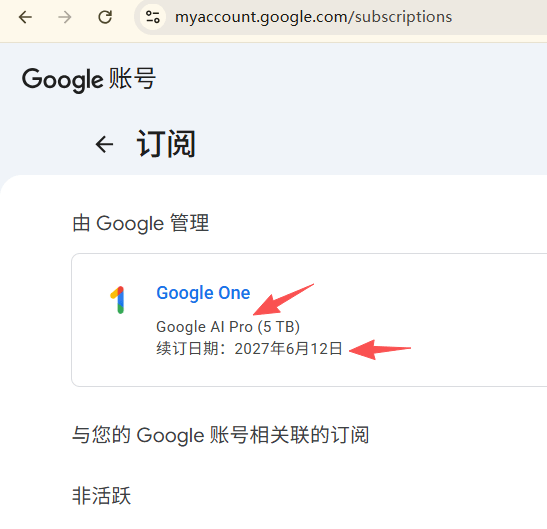
Follow the arrows in the screenshot to spot the two key details:
- Current Plan & Storage: For example,
Google AI Pro (5 TB)tells you the account is on the Pro tier with 5 TB of cloud storage. - Due / Renewal Date: The line below it—such as
续订日期:2027年6月12日in Chinese orRenews on Jun 12, 2027in English—marks the end of your current billing cycle. If auto-renew is on, you’ll be billed on this date; if you already canceled, it shows when your benefits expire.
In the English interface, open Wallet & subscriptions from the left menu and look under the Subscriptions card on the right for Renews on Jun 12, 2027.
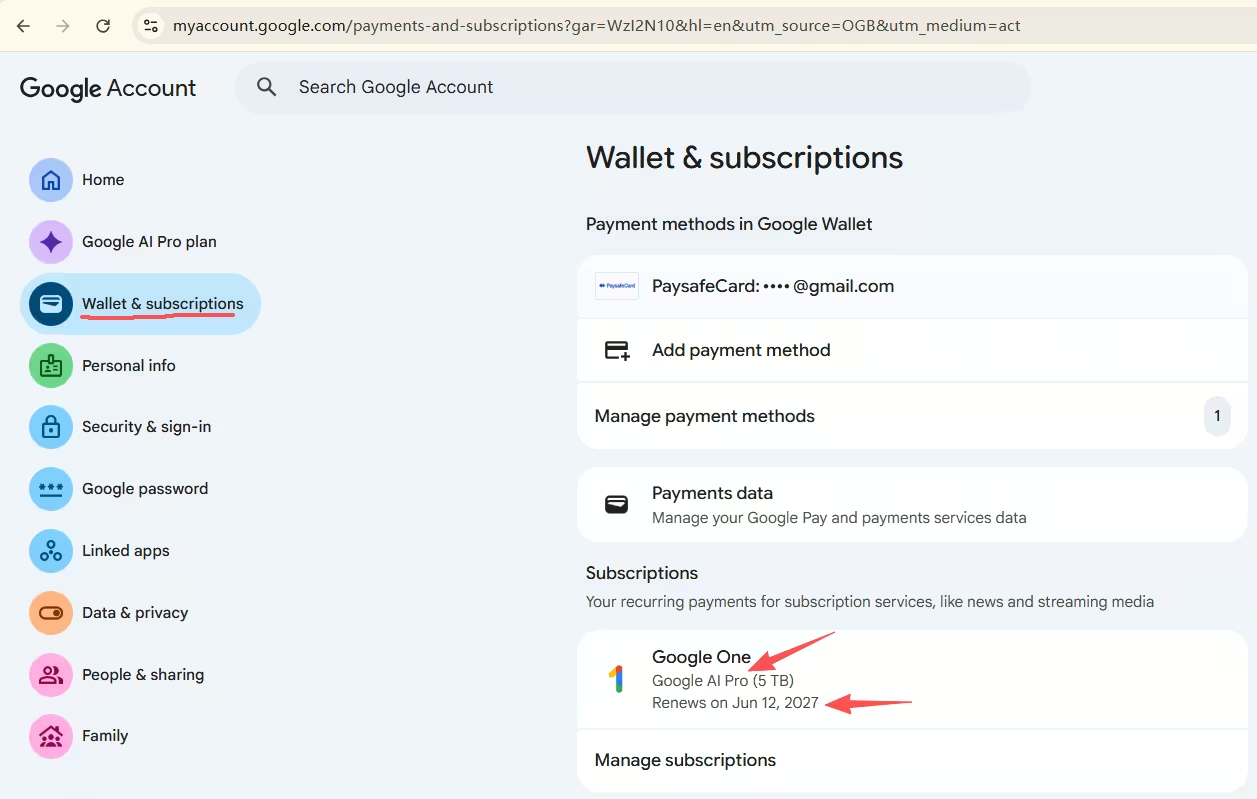
3. Quick Troubleshooting Tips
- Listed under “Inactive”: This means the account had a subscription in the past, but it has already expired or been canceled and no longer carries active benefits.
- Multiple Google Accounts Signed In: If you have several Gmail accounts logged into the same browser, opening the link might default to your primary account. Click your profile avatar in the top right to make sure you’re viewing the right one.
- Billed via Apple or Google Play: For mobile subscriptions billed through the App Store or Google Play, click Manage subscriptions or check your phone’s store subscription settings for the exact due date.
How Can I Check the Due Date for My Google One Subscription?
https://365note.abctool.info/p/how-can-i-check-the-due-date-for-my-google-one-subscription/