Online Word: Quickly Edit DOCX Files in Your Browser
Online Word Editor
With the advancement of modern web technology and AI-assisted development, building high-complexity software has become dramatically more accessible.
Creating a full-fledged rich-text document processor—once a high-barrier endeavor requiring thousands of engineers at enterprise giants—can now be crafted into a nimble, zero-install web application.
For example, check out this tool: Online Word Editor
UI Screenshot Preview
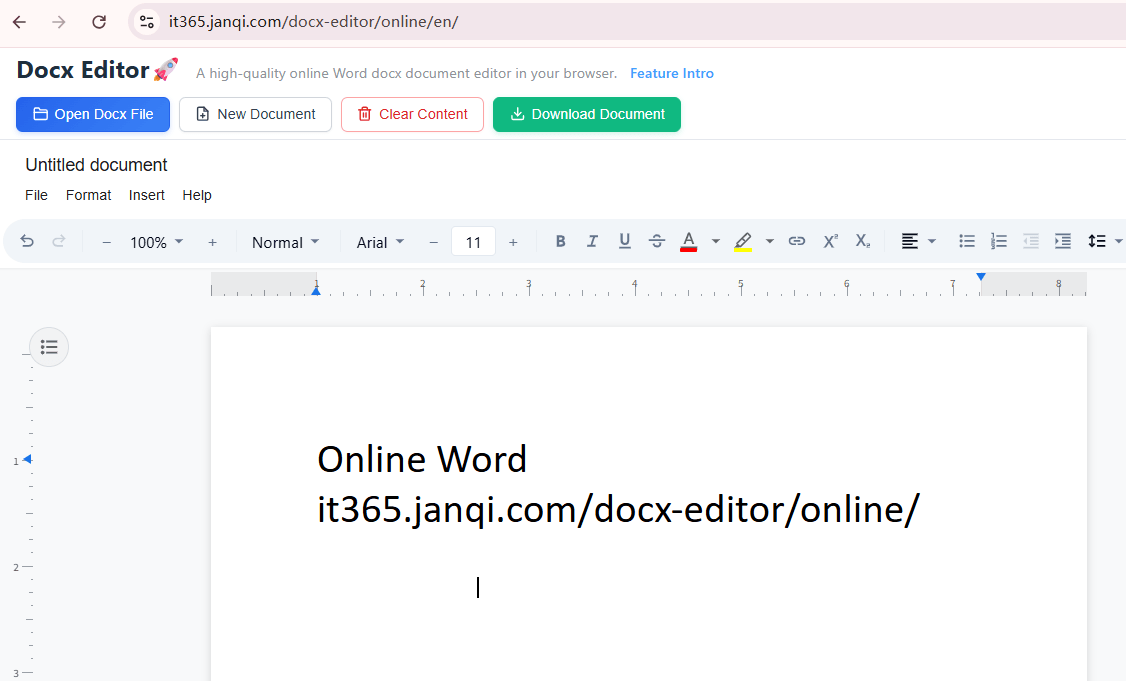
The interface and layout closely mirror Microsoft Word. After opening a .docx file, document formatting, alignments, and typography remain faithful to what you see in desktop Word or WPS—making it a capable, lightweight alternative.
Key Features & Capabilities
- Familiar Word-Style Interface: Intuitive ribbon layout for immediate productivity.
- Open & View DOCX: Directly import and view existing
.docxdocuments. - Rich Text Formatting: Adjust fonts, font size, text color, background highlights, bold, italic, and alignments.
- Direct Image Pasting: Paste screenshots directly from your clipboard into the document.
- Tables & Media: Insert customizable tables and graphics seamlessly.
- Undo / Redo Support: Full revision history navigation.
- Export to DOCX: Download your edited document back to standard
.docxformat with full layout integrity.
A Zero-Install Alternative for Daily Tasks
From opening a .docx document and updating paragraphs, to pasting screenshots and exporting back to disk, the entire editing cycle is smooth and completely free.
While it does not aim to reproduce every obscure enterprise macro of desktop Word, it effortlessly covers the vast majority of everyday document editing needs.
In past eras, software of this complexity was held back by massive engineering costs and long development lifecycles. Today, AI drastically reduces friction and cost, allowing practical user pain points to be solved with lightweight, efficient tools.
Try it online: Online Word Editor