How to Check Your Google Gemini Plan Type and Subscription Expiration Date
If you want to confirm which Google Gemini paid plan you’re on, when it expires, and what each tier actually includes, one quick visit to your Google Account dashboard gives you the full picture.
1. Check Your Plan Type and Expiration Date
Sign in to your Google account and open any of these official links:
- Subscriptions Page: https://myaccount.google.com/subscriptions
- Payments & Subscriptions: https://myaccount.google.com/payments-and-subscriptions
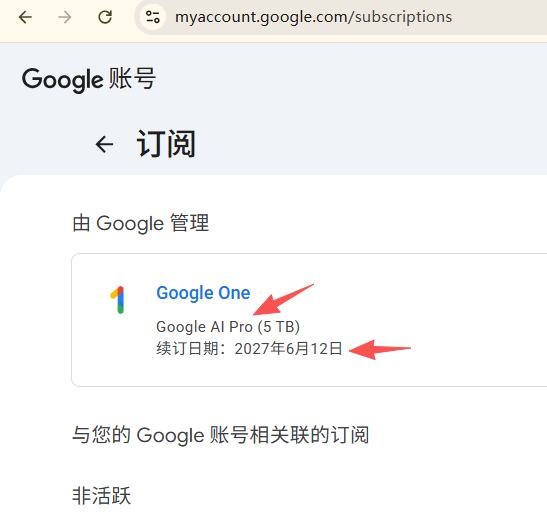
Under Managed by Google, look at the Google One card:
- Plan Type: e.g.
Google AI Pro (5 TB)tells you it’s the Pro tier with 5 TB of cloud storage. - Expiration / Renewal Date: The line below (
续订日期:2027年6月12日/Renews on Jun 12, 2027) shows when the current period ends.
2. Differences Between Google AI Plan Types
Google’s paid AI subscriptions fall into three main tiers:
Google AI Plus (Light Entry Tier)
Includes 400 GB of storage at around $4.99/month. Gives you roughly 2x the free Gemini chat quota and basic Nano Banana image generation/editing—great for everyday writing and quick lookups.
Google AI Pro (Mainstream Value Tier)
Includes 5 TB of storage at $19.99/month. Unlocks 4x+ higher usage limits, deep Gmail/Docs integration, generous image generation and editing limits, plus Pro-level model access in the Antigravity coding client.
Google AI Ultra (Flagship Power Tier)
Starts at 20 TB of storage, priced at $99.99/month (5x) or $199.99/month (20x). Built for heavy developers and creators, offering massive quotas, full access to frontier models like Gemini 4 Carbon, creative credits, and a YouTube Premium Family plan.
3. Pro Account Models & Speed Reference in Antigravity
If you’re on Google AI Pro and using Antigravity IDE, the model dropdown includes Gemini 4 Neon, Gemini 4 Argon, Gemini 4 Hydrogen, Orchestrator (Neon/Argon), Gemini 3.8 Flash, Claude Opus 5.5, Claude Sonnet 5.5, and GPT-OSS 120B (Gemini 4 Carbon currently shows as Unavailable on Pro).
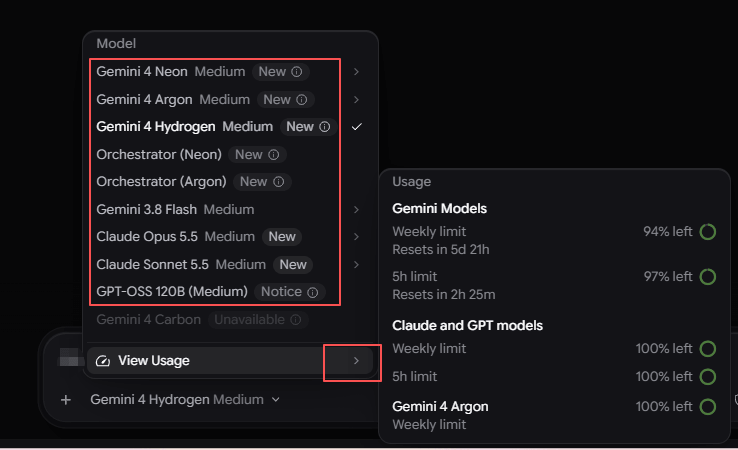
- Model list evolves: Available models update as Google ships new releases, so always go by what’s shown in your own client.
- Check reset times: Click
View Usageat the bottom of the dropdown to view remaining percentages and reset countdowns forGemini Models(5h + Weekly),Claude and GPT models(5h + Weekly), andGemini 4 Argon(Weekly). - Switch for speed: When a heavier model feels slow, switch to Gemini 4 Hydrogen (Medium) for fast output, or Claude Sonnet 5.5 (Medium) as a responsive alternative.