How to Disable Auto Updates and Downloads in Zed Editor
Zed is an ultra-fast, Rust-powered code editor praised for its near-zero input lag and instantaneous responsiveness.
By default, Zed automatically checks for newer versions and downloads updates in the background. If you prefer working in an unchanging, rock-solid environment, operate behind restricted corporate proxies, or simply dislike frequent update interruptions, you can easily disable automatic updates and background downloads directly through the graphical user interface.
Step-by-Step Guide to Disabling Auto Updates
Zed’s user interface is straightforward. Follow these steps:
1. Open the Settings Menu
- Click the hamburger menu icon at the top-left corner of the Zed window.
- In the dropdown menu, click
Open Settings(or pressCtrl + ,on Windows/Linux,Cmd + ,on macOS).
2. Navigate to the Auto Update Section
A visual Settings dialog will appear. In the left-hand sidebar:
- Click to expand
General. - Select the subcategory
Auto Update.
3. Toggle Off the Auto Update Switch
- In the right-hand panel, locate the
Auto Updatesetting (labeled: Whether or not to automatically check for updates.). - Click the toggle switch on the right to turn it Off (dimmed / grayed out).
Refer to the screenshot below:
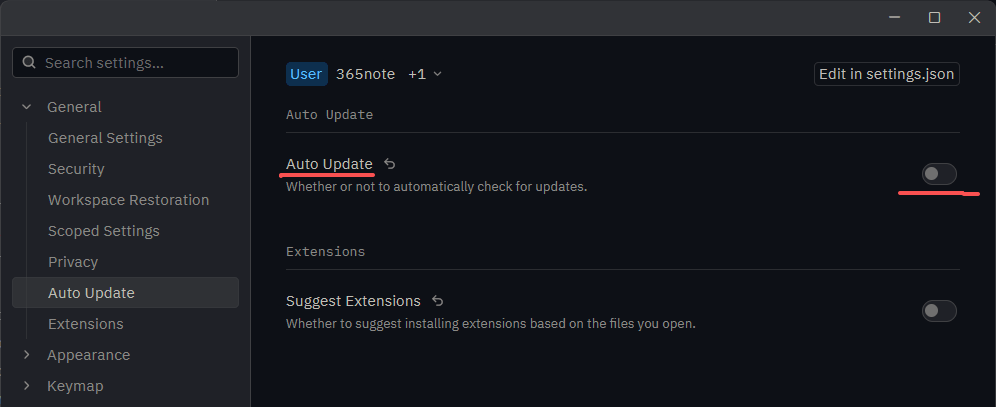
The change is applied immediately. Zed will no longer initiate network queries or silently download update binaries in the background.
Advanced Tips
- Direct JSON Configuration (
settings.json)
In the top-right corner of the Settings dialog, you will find anEdit in settings.jsonbutton. Clicking it opens your raw configuration file. Toggling the UI switch automatically appends:1
2
3{
"auto_update": false
} - Disable Extension Suggestions (Optional)
On the same settings screen, if you also wish to stop Zed from prompting you to install plugins based on file types you open, toggle offExtensions->Suggest Extensions.