Zed Editor Desktop IDE: Official Download & High-Performance VS Code Alternative
Zed is a next-generation code editor written entirely in Rust. Its snappy performance and fluid responsiveness are immediately noticeable. Zed is completely free and open source, boasting immense popularity on GitHub with nearly 100k stars. By default, Zed does not force intrusive AI assistance into your workflow, making it a perfect sanctuary for developers who prefer pure, unadulterated, distraction-free coding.
- Official Website: https://zed.dev
- GitHub Repository: https://github.com/zed-industries/zed
Key Highlights of Zed
- Extremely Low Memory Footprint: Minimal RAM consumption even with complex codebases.
- Lightning-Fast Responsiveness: Instantaneous typing feedback, file switching, and zero input latency.
Download Zed Editor
- Zed for Windows:
Download Zed Windows x86_64 Installer - Zed for macOS:
Download Zed macOS Apple Silicon / Intel DMG - Official GitHub Releases:
You can also download the latest stable and preview builds directly from the Zed GitHub Releases Page.
Native Git Integration & Built-in Features
Zed comes equipped with native Git features out of the box: branch status display, branch switching, and fuzzy branch search. In the top-left corner, you can switch between recent workspaces with astonishing speed.
Another handy built-in capability: when your cursor focuses on any line of code, Zed displays the author and commit information of the most recent Git commit, making it effortless to trace changes and commit histories without having to install third-party Git extensions.
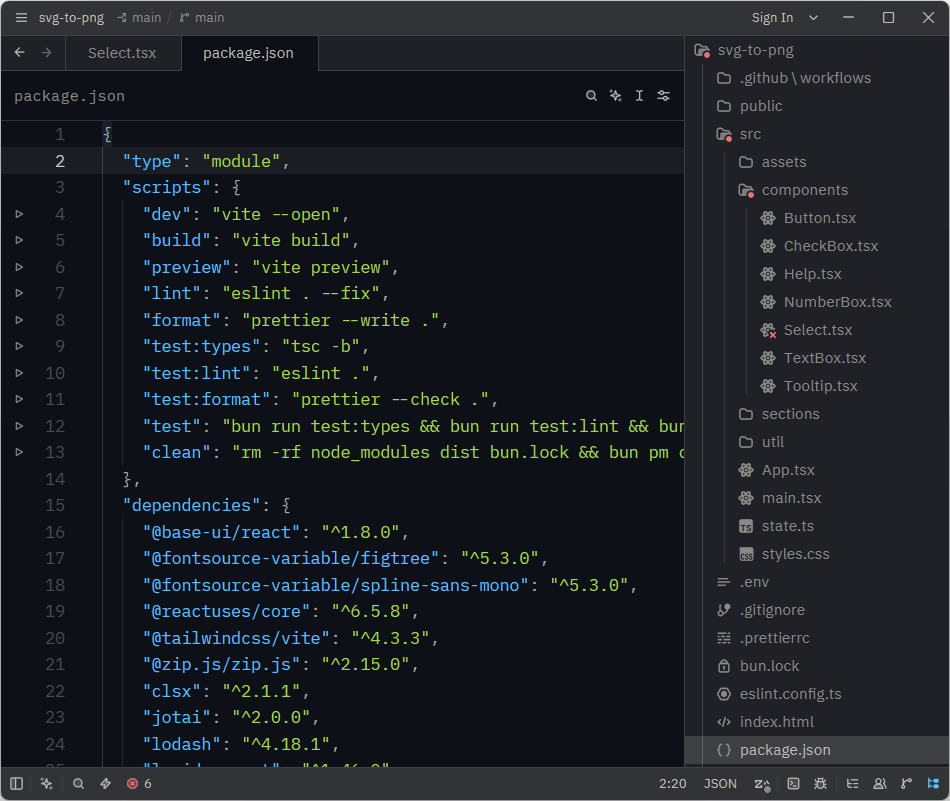
Quick Start Guide & Essential Shortcuts
Ctrl + P(orCmd + Pon macOS): Open the file finder. Type a file name to instantly locate and edit it.Ctrl + B(orCmd + Bon macOS): Toggle the project file tree panel.Ctrl + Shift + P(orCmd + Shift + Pon macOS): Open the Command Palette to execute any command. For example, typethemeto switch between dark and light themes, orcopyto copy relative or full file paths.
Electron in the AI Era: Will It Be Replaced?
With the rapid emergence of AI coding tools, many expected developers to abandon Electron-based editors quickly. However, Electron remains dominant because virtually all major AI coding environments are built atop Electron and VS Code forks:
- VS Code: Core architecture built on Electron.
- Cursor / Kiro: Extended directly from Electron and VS Code.
- Trae, Qoder, Antigravity IDE, CodeBuddy, JoyCode: All leverage the VS Code + Electron foundation.
Replacing Electron overnight is impractical due to the sheer engineering complexity and massive ecosystem inertia of VS Code. However, as AI capabilities continue to surge, transitioning to ultra-fast native Rust engines like Zed may become dramatically cheaper in the future.
Memory (RAM) Comparison: Zed vs VS Code
Because Zed is built in Rust with GPU-accelerated rendering, its memory management is exceptional:
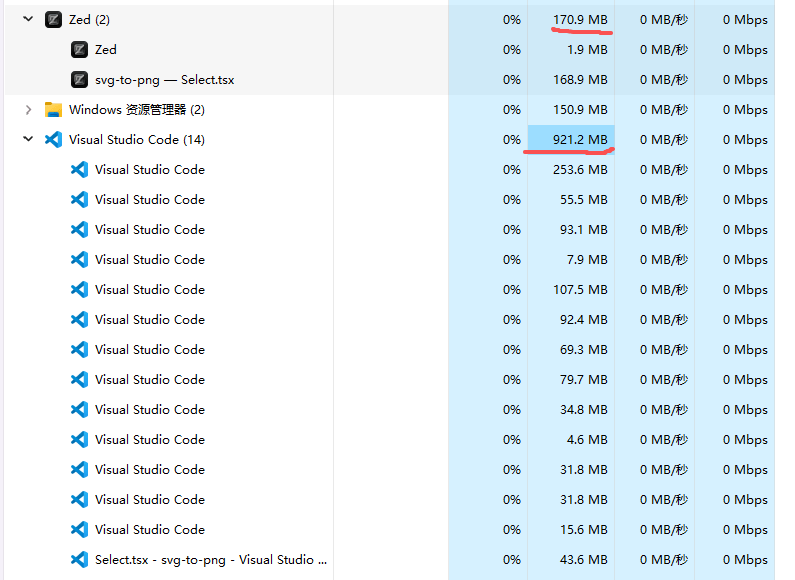
When opening the exact same repository and file:
- Zed: Uses only approximately 170.9 MB.
- Visual Studio Code: Uses approximately 921.2 MB.
In identical circumstances, the memory consumption of VS Code is more than 5 times that of Zed. This efficiency explains why Zed feels so silky smooth, especially on machines with constrained RAM. Tested versions: Zed v1.26.2 vs VS Code v1.138.0.
Other lightweight, resource-conscious editors to consider:
- Lapce (Rust-based)
- Sublime Text (C++ native)
For a broader overview of editor alternatives, check out our guide: Best VS Code Alternatives and Lightweight Editors.
Language Support and Localization
Currently, Zed officially operates in English. Because editor terminology consists of familiar developer keywords, using it is straightforward with virtually no language barrier. Third-party localization forks exist on GitHub for users seeking regional translations.
Key Differences Between Zed and VS Code
Both Zed and VS Code serve as modern code editors and IDE alternatives, sharing similar core editing workflows:
- Architecture & Foundation: Zed is engineered natively in Rust for near-metal performance and tiny memory overhead. VS Code relies on Web technologies (Node.js/Chromium/Electron), resulting in higher memory demand but making extension authoring exceptionally accessible.
- Ecosystem & Maturity: VS Code enjoys a decade-long ecosystem with thousands of extensions, debugging adapters, and rich AI integrations. Zed is newer, with a rapidly growing but comparatively concise extension ecosystem.
- Speed & Responsiveness: Zed offers near-instant startup, lag-free scrolling, and instant file jumps, whereas VS Code can become sluggish with heavy plugins.