Gemini 4 Hydrogen Released: Completely Fixes Gemini 3.8 Flash Slowness and Lag
Google’s release of the Gemini 4 Hydrogen model has finally fixed some real pain points.
Antigravity editor recently added Gemini 4 Hydrogen as well. Previously, using Gemini 3.8 Flash often meant dealing with sluggish responses and stuttering output (mostly because it spent way too long thinking and verifying). Switching to Gemini 4 Hydrogen (Medium) makes everything noticeably smoother—it pretty much puts an end to the slow, laggy experience of 3.8 Flash.
Gemini 4 Hydrogen brings back the snappy response and fast task completion of Gemini 3.7 / Gemini 3.5.
How Is Gemini 4 Hydrogen in Practice?
After using it for a while and building a few features with it, here’s how it feels:
- Fast: Can finish multiple features in under a minute
- Capable: Smart reasoning and solid overall intelligence
- Strong at web dev: Handles web development tasks very well
- Accurate comprehension: Understands text, phrasing, and prompts accurately
It really redeems itself here, finally fixing the slow, laggy issues of Gemini 3.8 Flash.
Available Models on a Pro Account
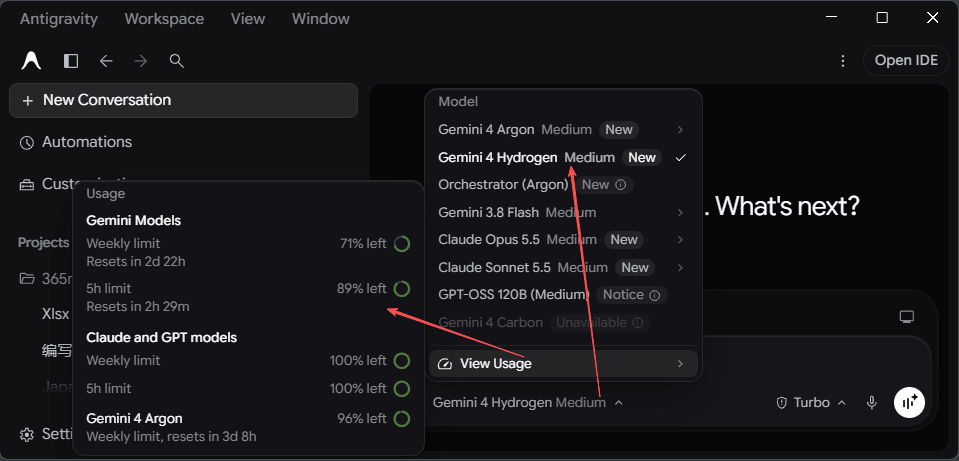
Opening the model dropdown menu on a Pro account currently shows these options:
- Gemini 4 Hydrogen (Medium): Newly released main model, fast and responsive
- Gemini 4 Argon (Medium): Newly released model, suited for heavier reasoning tasks
- Orchestrator (Argon): Newly released orchestration model
- Gemini 3.8 Flash (Medium): Previous-generation lightweight model
- Claude Opus 5.5 (Medium): Newly released Claude flagship model
- Claude Sonnet 5.5 (Medium): Newly released Claude balanced model
- GPT-OSS 120B (Medium): Open-weight large parameter model
- Gemini 4 Carbon: Listed in the menu, but currently marked
Unavailable
How to Check Your Token Quota
Checking your remaining quota takes two clicks, as shown by the arrows in the screenshot:
- Click the active model name below the chat input box (e.g.,
Gemini 4 Hydrogen Medium) to open the model menu. - Click
View Usageat the very bottom of the menu to open theUsagepanel on the left.
How Quota Refreshes Work
As shown in the Usage panel, quotas are split into three separate pools, each tracking its own reset timer:
- Gemini Models (standard Gemini models): Uses both a 5h limit and a Weekly limit. Each has its own countdown timer and resets automatically when time is up (for example, in the screenshot, the 5h limit resets in 2h 29m and the Weekly limit resets in 2d 22h).
- Claude and GPT models (shared between Claude 5.5 and GPT-OSS 120B): Also uses the 5h limit + Weekly limit setup, completely separate from your Gemini quota.
- Gemini 4 Argon: Tracks its own Weekly limit on an independent weekly reset timer, without eating into the other two pools.