Best VS Code Alternatives and Lightweight Editors (Free & Open Source)
Visual Studio Code boasts an unmatched extension ecosystem and rich capabilities, but its Electron architecture introduces real trade-offs: persistent memory bloat, high CPU cycles, and occasional window stuttering when managing multiple microservices or large frontend codebases.
If you are looking for lightweight, high-performance replacements or specialized AI forks to refresh your development workflow, here is a curated overview of the best VS Code alternatives available today.
1. High-Performance Standalone Editors (Zero Bloat)
1. Zed
Crafted in Rust by the creators of Atom and Tree-sitter, Zed provides near-metal execution and GPU-accelerated rendering:
- Near-Zero Latency: Instant typing response, ultra-fast file navigation, and imperceptible latency.
- Built-in Git Suite: Native branch switching, fuzzy search, and automatic per-line commit blame without relying on heavyweight third-party extensions.
- Read our comprehensive walkthrough: Zed Editor Desktop IDE: Official Download & Setup Guide.
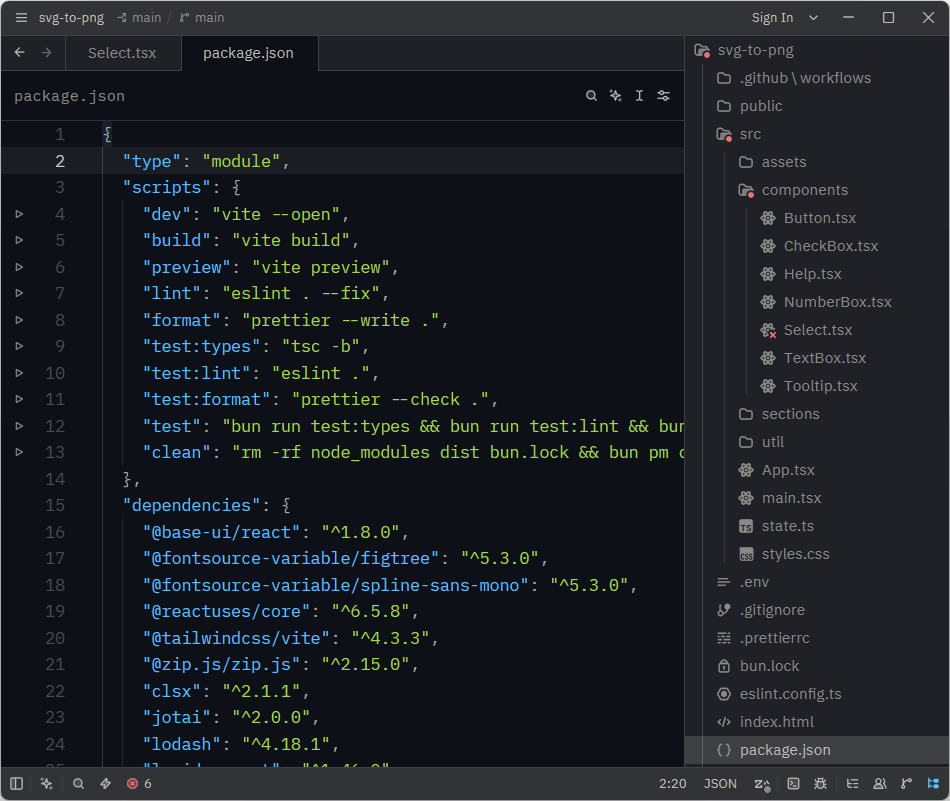
The interface is minimal and distraction-free:
Its memory control dramatically outperforms VS Code in direct side-by-side benchmarking:
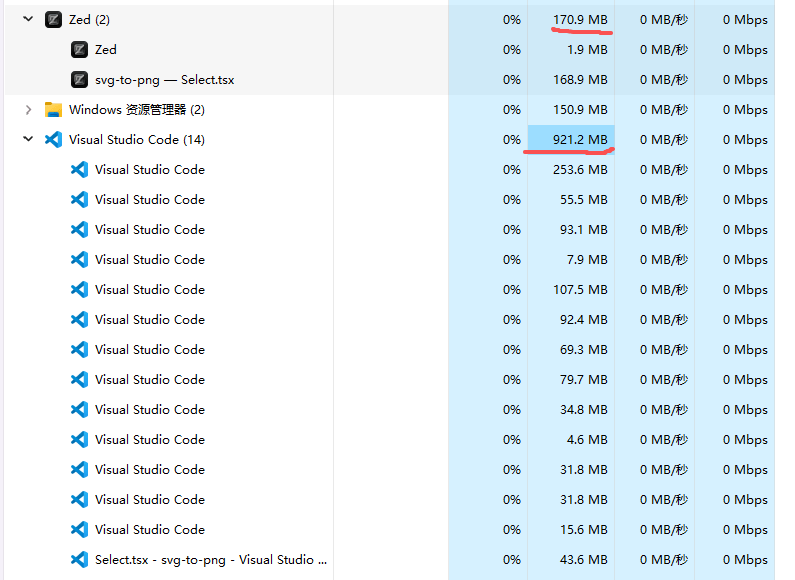
When loading the exact same project workspace:
- Zed: Consumes merely ~170.9 MB.
- VS Code: Spikes to ~921.2 MB.
With a 5x lower memory footprint, Zed keeps your development machine cool and quiet. Moreover, Zed defaults to pure, unbloated editing without forcing intrusive AI suggestions down your throat.
2. Lapce
Lapce is an open-source, lightning-quick modern editor also engineered purely in Rust:
- Built upon Rust’s Druid UI framework, launching in the blink of an eye.
- Native support for remote workflows (Remote SSH, WSL, Docker container development) where code execution happens server-side and local clients only handle lightweight rendering.
- Trade-off: The extension ecosystem and IME handling are still maturing, but it serves admirably as a rapid secondary scratchpad.
3. Sublime Text
The timeless gold standard for ultra-fast C++ desktop text editing:
- Opens within milliseconds with a tiny installer under 50 MB.
- Effortlessly opens multi-gigabyte log dumps and raw data dumps without locking up your operating system.
- Trade-off: Evaluative popups periodically remind you to purchase a license, though you can dismiss them and keep developing for free.
4. VSCodium
If you cannot part with your muscle-memory keybindings, settings files, and VS Code extensions, but object to proprietary telemetry tracking:
- Clean community binary builds directly compiled from the open-source
vscode(Code - OSS) repository. - Strips out Microsoft telemetry, tracking beacons, and proprietary licenses.
- Seamlessly points to Open VSX, giving you access to popular extensions without vendor lock-in.
5. Notepad++
A classic Windows text editing workhorse:
- Extremely compact, handling huge single scripts, INI configurations, and log files effortlessly.
- Trade-off: Best suited for quick note-taking, encoding conversions (UTF-8/GBK), or log inspection. It lacks modern language server intelligence (LSP) and multi-folder project workspaces needed for full-stack engineering.
2. AI-Native Code Editors (VS Code Forks & Re-imaginations)
If you love the VS Code paradigm but want turnkey, built-in AI pair programming without juggling external API keys:
- Cursor: A leading AI-first editor globally, renowned for deep codebase indexing and autonomous multi-file agent workflows.
- Antigravity IDE: Google’s frontier AI engineering suite, deeply wired into next-generation reasoning models (Gemini, Claude, GPT).
- Trae: ByteDance’s modern AI IDE featuring sleek visual aesthetics and project-wide code generation.
- CodeBuddy: Tencent’s AI IDE featuring generous free quotas and streamlined localized workflows.
- Qoder: Alibaba’s AI engineering editor, integrating Tongyi Lingma and cloud infrastructure hooks.
- JoyCode: JD.com’s AI assistant editor, convenient for automated test writing and code refactoring.
- Zcode: Zhipu AI’s coding platform powered by GLM series models.
- Kiro: Amazon’s IDE initiative with Cursor-like AI assistance capabilities.
Which One Should You Pick?
- For ultimate responsiveness, battery longevity, and low RAM: Choose Zed as your daily driver, with Sublime Text standing by for massive logs.
- For full VS Code compatibility without telemetry: Install VSCodium.
- For cutting-edge AI pair programming: Explore Cursor, Antigravity IDE, or Trae.