How to Check Your Antigravity Expiration Date and Usage Quota
When coding with Antigravity IDE, people often ask how to check when their account expires. There are actually two separate things to check: when your Google membership expires, and when your in-app token quota resets.
1. How to Check Your Antigravity Account Expiration Date
The Antigravity client only shows your remaining model quotas—it doesn’t display billing or membership expiration dates. To check when your subscription expires, sign in to the web dashboard with the same Google account:
- Direct Subscriptions Page: https://myaccount.google.com/subscriptions
- Payments & Subscriptions: https://myaccount.google.com/payments-and-subscriptions
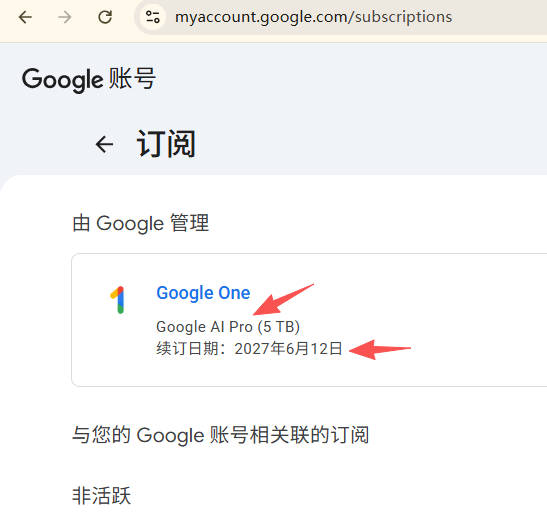
Find the Google One card—it shows your plan tier (e.g. Google AI Pro (5 TB)) and the exact renewal/expiration date (续订日期:2027年6月12日 / Renews on Jun 12, 2027).
2. Checking Available Models, Remaining Quota, and Reset Times
If you want to know how much usage you have left and when your quota refreshes, you can check directly inside the Antigravity client:
- Click the current model name at the bottom left of the prompt box to open the model menu.
- Click
View Usageat the bottom (highlighted in red) to open theUsagepanel on the right.
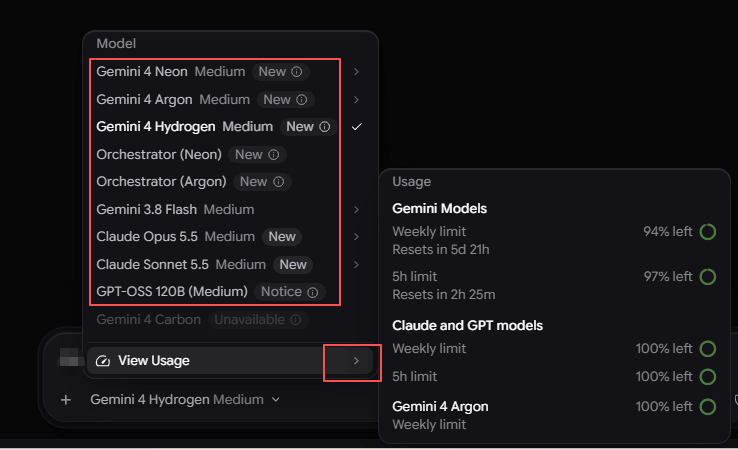
As shown in the Usage panel, quotas are split into three independent pools, each with its own reset timer:
- Gemini Models: Uses both a
Weekly limit(e.g. 94% left, resets in 5d 21h) and a5h limit(e.g. 97% left, resets in 2h 25m). - Claude and GPT models: Also tracks a separate
Weekly limitand5h limit, without consuming your Gemini pool. - Gemini 4 Argon: Has its own standalone
Weekly limit.
3. Which Models Are Available on a Pro Account? Which Is Fastest?
From the screenshot above, a Google AI Pro account currently has access to these models in Antigravity:
- Gemini 4 Hydrogen (Medium)
- Gemini 4 Neon (Medium)
- Gemini 4 Argon (Medium)
- Orchestrator (Neon) / Orchestrator (Argon)
- Gemini 3.8 Flash (Medium)
- Claude Opus 5.5 (Medium) / Claude Sonnet 5.5 (Medium)
- GPT-OSS 120B (Medium)
- Gemini 4 Carbon is listed at the bottom as
Unavailable(typically requires a higher tier or pending rollout).
Note: This model list changes as Google rolls out new models and updates availability—always check your local Antigravity client for the latest options.
Speed tip: If a model feels sluggish or spends too long thinking while coding, switch to Gemini 4 Hydrogen (Medium). It responds noticeably faster and resolves the lag issues that used to affect Gemini 3.8 Flash. Claude Sonnet 5.5 is another solid fallback if you want a good balance of speed and code quality.